

insert, add_computed_column, collect, and the rest) is one trace. At span_level='debug' an OpenAI insert looks like this. openai.chat_completions runs on a resource pool, so its UDF span sits beside pixeltable.row. A UDF without a resource pool nests under pixeltable.row.
logfire.instrument_openai() records. The export path uses OpenInference instead, and that child span is named ChatCompletion.
This page matches Pixeltable 0.7.19, Logfire 5.2.0, and
opentelemetry-instrumentation-pixeltable 0.1.0. pixeltable[otel] installs that package from PyPI.Choose an approach
Install
pixeltable[otel] installs the Pixeltable bridge, the OpenTelemetry SDK, and the OTLP exporters. logfire is the SDK path. openai is the client that chat_completions() calls. Neither Pixeltable nor the instrumentor installs it. The export path uses openinference-instrumentation-openai for generation spans. The SDK path uses logfire.instrument_openai() and does not need the OpenInference package.
Set the environment
A write token belongs to one Logfire project, and that project lives in one region. Create the token under Project, then Settings, then Write tokens.logfire.configure() reads LOGFIRE_TOKEN.
https://logfire-us.pydantic.dev. EU is https://logfire-eu.pydantic.dev. The header value is the write token. Logfire’s OTLP examples do not put Bearer in front of it.
Export spans to Logfire
pxt_otel.init() builds the tracer provider and starts Pixeltable’s spans. For OTLP/HTTP it appends /v1/traces unless the endpoint already ends in that path, so pass the regional base URL, not a URL that already ends in /v1/traces. Metrics are exported when an endpoint is set. Logfire accepts them. Pass metrics=False to send traces only.
Call pxt_otel.init() once in the process, before the first Pixeltable operation. The default protocol is http/protobuf.
A
pxt_otel.init() argument overrides the config. With the argument left unset, endpoint and protocol resolve from the database entry (db_exporter_otlp_endpoint, db_exporter_otlp_protocol in pixeltable.toml), then OTEL_EXPORTER_OTLP_ENDPOINT and OTEL_EXPORTER_OTLP_PROTOCOL, then the [otel] section of ~/.pixeltable/config.toml. headers resolves from OTEL_EXPORTER_OTLP_HEADERS, then [otel]. Build the Authorization value from environment variables, and never write the token into code. On a hosted database, run pxt secret set pxt://<org>:<db> OTEL_EXPORTER_OTLP_HEADERS='Authorization=<write-token>', then pxt db restart pxt://<org>:<db> and pxt service restart pxt://<org>:<db>/<service>. Configuration.pxt.table, pxt.path, pxt.column, pxt.udf_path, and, for a resource-pool call, pxt.resource_pool and pxt.retries. The model, prompt, completion, and token counts are on the OpenInference span. While an operation span is active, Pixeltable sets the OpenTelemetry context for that UDF call, including across its thread pools and async scheduler, so the generation nests under the UDF span. The span name is pixeltable.udf. plus the UDF’s display name, so this column is pixeltable.udf.chat_completions.
span_level='trace' adds a span per iterator step. At the default 'info', row and UDF spans are omitted, and the generation nests under pixeltable.store.insert_rows.
Setting only OTEL_EXPORTER_OTLP_TRACES_ENDPOINT does not start export. Set OTEL_EXPORTER_OTLP_ENDPOINT or pass endpoint. pxt_otel.init() sets service.name to pixeltable when service_name is left unset.
Declare the table and insert
An application file puts the columns on aTableModel. pxt schema update app.py my_app creates my_app.articles. The insert runs in the process that called pxt_otel.init().
A script can create the same column with create_table and add_computed_column in that same process. Both forms store the completion text. The model runs when the row is inserted.
- Application file
- Script
pxt_otel.init():--otel to pxt service run or pxt service update (Tracing). It calls pxt_otel.init() with no arguments before it loads the app file, so configure the export in the environment, or in the matching [otel] keys. The variables in Set the environment are that configuration.
pxt service run reads these variables in its own process. pxt service update starts the service from the Pixeltable daemon, which reads the environment once, so run pxt daemon restart after the exports.
If the database entry in pixeltable.toml sets db_exporter_otlp_endpoint, it wins over OTEL_EXPORTER_OTLP_ENDPOINT, so set the Logfire endpoint on that entry instead.
--otel calls pxt_otel.init() and instruments FastAPI. It does not instrument OpenAI, and an OpenAIInstrumentor().instrument() in another process does not carry into this one. Put this at module scope in app.py. The service loads the file after init(), so the instrumentor attaches to that provider:
pxt_otel.init(): with --otel, that second call raises INVALID_STATE, and without --otel it records Pixeltable spans but not the FastAPI request spans. Use this path or the Logfire SDK in a process, not both. The SDK path calls logfire.instrument_openai() instead of OpenAIInstrumentor.
Use the Logfire SDK
logfire.configure() installs Logfire as the global tracer provider and reads LOGFIRE_TOKEN. Logfire 5.2.0 also adds OTLPSpanExporter() when OTEL_EXPORTER_OTLP_ENDPOINT or OTEL_EXPORTER_OTLP_TRACES_ENDPOINT is set, beside the exporter it builds from LOGFIRE_TOKEN. The export block above sets the first of those. Unset both before configure(), or each span is sent twice. PixeltableInstrumentor().instrument() attaches to the provider configure() installed. It does not build an exporter of its own. Call both once, before the first Pixeltable operation.
logfire.instrument_openai() patches openai, including the AsyncOpenAI client that pixeltable.functions.openai uses. suppress_other_instrumentation (the default) quiets the HTTPX spans that client would otherwise emit. It does not quiet openinference-instrumentation-openai. Leave that package uninstrumented on this path, or each call records a Logfire span and an OpenInference span.
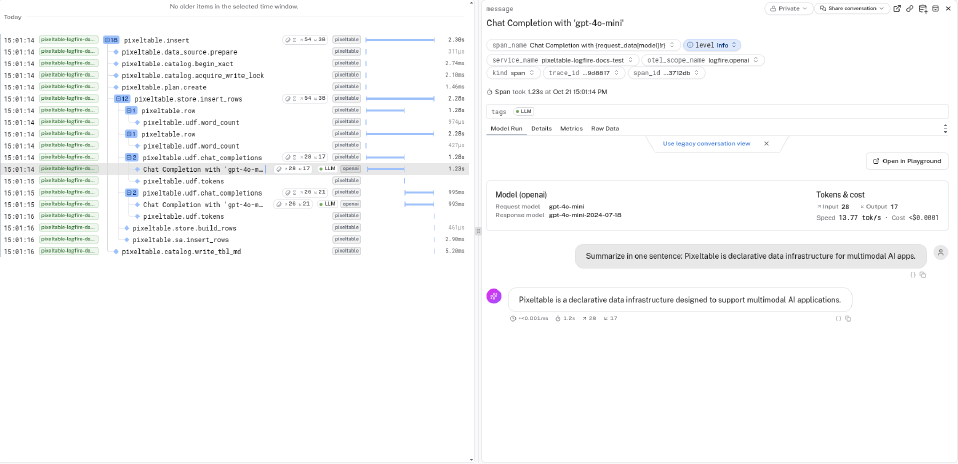
Chat Completion with 'gpt-4o-mini', nested under pixeltable.udf.chat_completions.
The word_count span in the screenshot under View the traces is this UDF. It has no resource pool, so it nests under pixeltable.row. A UDF defined in the __main__ module of a script is rejected. Put it in a module, then add it to the table from the script above.
View the traces
Open the project and go to the Live view. Filter forpixeltable.insert. The trace contains pixeltable.store.insert_rows, a pixeltable.row span, and pixeltable.udf.chat_completions beside that row. Under the UDF span, the SDK path shows Chat Completion with 'gpt-4o-mini' with the model, token counts, and cost. The export path shows ChatCompletion there instead.
create_table, add_computed_column, and collect each appear as their own trace.
Caveats
- With the bridge on, every Pixeltable operation is a trace, including
create_dir,create_table,drop_dir, andcollect.span_level='info'drops the per-row, per-UDF, and per-file spans. On an insert, the OpenAI span then nests underpixeltable.store.insert_rows. - Per-row spans stop at 100 rows in one operation. A provider call on a resource pool still gets its
pixeltable.udf.*span. - Computed-column values are stored.
collect()records a Pixeltable span and does not call the model again. The model runs oninsert, onupdate, and whenadd_computed_columnbackfills existing rows. - Flush before the process exits:
trace.get_tracer_provider().force_flush()afterpxt_otel.init().logfire.configure()exports on its own schedule. A short script should still flush the provider. - Call
pxt_otel.init(), orlogfire.configure()andPixeltableInstrumentor().instrument(), before the first Pixeltable operation.pxt_otel.init()runs once per process. - A 401 or 403 means the write token is missing or the endpoint is the other region. On the export path, an unset
service_nameputs the data underpixeltable. On the SDK path,logfire.configure()with noservice_nameleaves OpenTelemetry’sunknown_service.
Observability
Span tree, metrics, and a Grafana Cloud export.
Alternative clients
Logfire’s regional OTLP endpoints and write-token header.